Focusing
A well-focused telescope is essential for every successful observation, especially when deep-sky exposures are taken. With a small amount of practice, the optimal focus can usually be found within a few minutes. The following guide provides assistance with this task.
General remarks
The telescope is focused using an Electronic Focuser Assembly (EFA), which can be controlled manually via a hand terminal or via the Observatory Management System (OMS). Since the EFA has a limited adjustment range (33mm), different adapters (M68) can be mounted on the EFA so that the focus can be achieved with different instruments.
Calculation of the ideal adapter
Empirical values with regard to the focus:
| Instrument | Adapter [mm] | Position of the EFA [μm] |
|---|---|---|
| QHY600M | 20+10 | 16900 |
| SFT-8300 | 40+10 | 9500 |
| Canon 700D | 20+10 | 13000 |
| Baches + QHY268M | 10 | 15000 |
| Baches + QHY268M + Barlow | 20 | 17500 |
| DADOS + QHY268M | 0 | 5000 |
| Hyperion eyepiece: 36mm | 80 | 14500 |
| Hyperion eyepiece: 22mm | 80 | |
| Hyperion eyepiece: 13mm | 80 | 25200 |
| Canon + Superzoom | 80 | 19550 |
Focus using the hand terminal
A hand-held terminal (figure 1) is available for manual operation of the EFA. The hand-held terminal is located in the movable storage container in the dome. The hand terminal must be connected to the black control box labeled Electronic Focusing Accessory on the back of the telescope.
The cable of the hand-held terminal needs to be plugged into the port labeled H/C (see figure 2). The hand terminal itself should then be hung on a silver bolt in the immediate vicinity of the control box. If the hand terminal is connected, control via the OMS is not possible. Therefore, the hand terminal is usually not attached to the telescope.
With the buttons In and Out on the hand terminal, the EFA can be moved inward and outward. The remaining buttons are intended for a derotator, which our telescope does not require. Therefore, these buttons have no function.


Focusing with the Observatory Management System (OMS)
Focusing via the OMS is performed using the program PWI4. In addition to controlling the focuser, this program also regulates the fans and the heaters installed in the telescope. These two aspects are described in more detail in the article temperature regulation.

The operation of the EFA is largely self-explanatory. The current position can be found in the field Position, while the EFA can be moved using the buttons IN and OUT. The speed of the focuser can be adjusted under Jog by entering a value next to it. We recommend the standard setting of 200 micron/s.
Using the GOTO menu, the EFA can be moved to a specific position. An ongoing movement can be stopped at any time using the STOP button. The temporal evolution of the temperature of the main mirror, the support of the main mirror, the secondary mirror, and the ambient temperature can be shown or hidden using the buttons SHOW and HIDE, respectively.
Auto Focus
Manual focusing can be tedious, even when a suitable focus point is already known from previous observations. For this reason, several programs offer automatic focusing methods. Here we list focusing with PWI4, MaximDL, NINA, and others. The program used depends on the observer's preferences and the target.
Maxim DL
This part needs to be written.
NINA
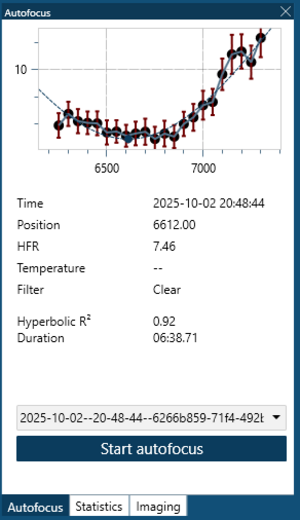
In NINA the autofocus can be started by selecting Imaging and then selecting autofocus on the right-hand side. After selecting autofocus, NINA will automatically start the process.
Note that the focuser must first be started via PWI4 and connected via the Equipment tab. Furthermore, NINA will use whichever filter is currently selected.
A successful autofocus run can be recognized on the left side of the interface, where a clear hyperbolic relation becomes visible. In the example shown, the run took about 6:30 minutes and determined 6612 as the optimal focus position for the clear filter.
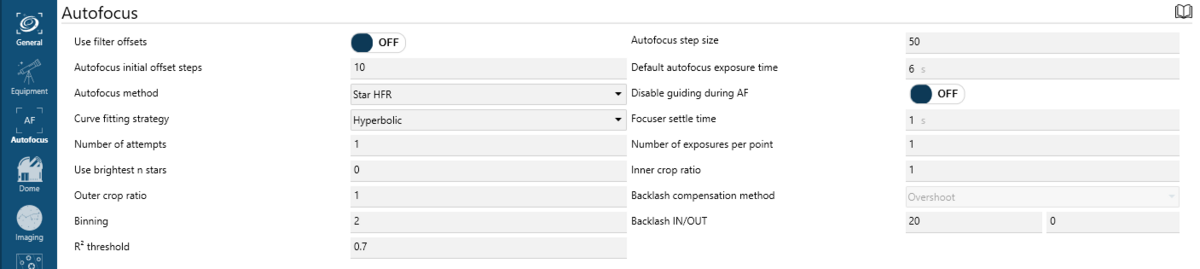
Under Options > Autofocus the settings for fine-tuning the autofocus can be found. An image of these settings is shown below the documentation.
- Use filter offsets lets you apply predefined offsets per filter instead of refocusing every time (currently not available; test observations required). Default: OFF
- Autofocus initial offset steps determines how far the focuser initially moves outward to start the autofocus. Default: 10
- Autofocus method: Default: Star HFR (Half-Flux Radius of stars)
- Curve fitting strategy: Function used to fit the measured data points. Default: Hyperbolic
- Number of attempts: How many times NINA retries autofocus if the first attempt fails. Default: 1
- Use brightest n stars: If >0, only the n brightest stars are used instead of all detected stars. Default: 0
- Outer crop ratio: If 1, the overscan region is cropped. Default: 1
- Binning: Pixel binning during autofocus. Default: 2×2
- R² threshold: Minimum quality fit for the autofocus curve before retrying. Default: 0.8
- Autofocus step size determines how far the focuser moves between samples. Default: 150
- Default autofocus exposure time: Exposure duration (in seconds) per autofocus frame. Needs to be adapted for other filters. Default: 6 s
- Disable guiding during AF: Turns off guiding while autofocus runs. Default: off
- Focuser settle time: Delay after a focuser movement to allow mechanical settling. Default: 1 s
- Number of exposures per point: How many frames are taken at each step. Default: 1
- Inner crop ratio: Fraction of the frame used for detecting stars. Default: 0.5
- Backlash compensation method: Method used to cancel mechanical backlash. Available are
OvershootandDisable. Default: Overshoot - Backlash IN/OUT: Step count used to clear backlash when moving in or out. Default: 20,0
PWI 4
PWI4 also offers the possibility of automatic focusing. For this purpose, PWI4 can connect to ASCOM camera drivers. The corresponding setting can be changed in the Camera tab of the settings dialog. Set Selected device to ASCOM camera and select the corresponding camera driver from the ASCOM driver drop-down menu.
Afterwards, the autofocus settings can be adjusted in the Auto Focus section of the Focus tab in the main window of PWI4. The parameter Images defines the number of focusing steps. Spacing specifies the step size in micrometers that the EFA moves between individual steps. The exposure time and binning must be specified under Exp length and Binning, respectively.
The following settings have proven useful:
  Images     = 17
  Spacing    = 150
  Exp length = must be chosen depending on the object/filter (6 s for stars using the clear filter is a good starting value)
  Binning    = 2

The following needs a revision…
After starting the autofocus routine, PWI4 performs the individual focusing steps, moves the EFA by the value specified in Spacing, and takes one image at each position. Afterwards, PWI4 starts the program PlateSolve, which analyzes each image, searches for stars, determines their diameters, and estimates the focus quality. The results are then listed in a table.

In the following we show an example of a successful and an unsuccessful autofocus run:
Successful autofocus:


Unsuccessful autofocus:


There are several reasons why an autofocus run can fail. One reason is that the optimal focus lies outside the range covered by the autofocus routine. It is therefore recommended to roughly focus the telescope manually beforehand. Another possibility is that no stars are detected and the focus quality cannot be estimated.
The traditional approach
Replace images…
The traditional method of focusing involves observing a region of the sky that contains a large number of closely packed stars, such as a globular cluster. Under such conditions, the quality of the focus can be judged easily by determining the focus position that allows the largest number of these stars to be resolved individually.
For this approach, Maxim DL is the most user-friendly software because it offers the most diagnostic tools by default. However, the most important quantities can also be found in the Statistics section of the Imaging tab in N.I.N.A. In the following, we focus on Maxim DL.
Maxim DL main controls
In the Exposure Tab of the Camera Control window (see below), select Focus in the Exposure Preset drop-down menu. In this preset many settings important for focusing are already preselected.
In the examples shown below the exposure time (Seconds) is set to one second. This value must be adjusted according to the object used for focusing.

After clicking Start, images are continuously taken and displayed. The telescope can now be focused using PWI4 or the hand terminal of the EFA. To find the coarse focus, it is recommended to first point the telescope at a bright star and adjust the focus until the diffraction ring disappears.
To further optimize the focus, a globular cluster can be observed. The small angular separation between the stars in a globular cluster allows very precise focusing, because the Airy disks of individual stars can only be separated with a very well-focused telescope.
An optimally focused telescope operates at the seeing-limited resolution, which at our site is often larger than 2″. This is significantly worse than the diffraction-limited resolution of our telescope, which is about 0.3″. The Rayleigh criterion describes the theoretical limit at which two Airy disks can still be recognized as separate light sources.
The lower three panels of the Camera Control window can display various information about the connected cameras as well as statistical information about the images. The display mode can be changed by right-clicking on one of the panels.
If no guiding camera is used, the following configuration is recommended:
- left panel:
3D ProfileorFWHM/time - middle panel:
Camera 1 Info - right panel:
Camera 1 Stats

The information in the left and right panels refers to the brightest star in the field of view.
The 3D Profile shows a three-dimensional representation of the brightes star, with the intensity representing the third axis. FWHM/time shows the Full Width at Half Maximum (FWHM) of this star as a function of time.
The right panel shows:
- the position of the brightest pixel in X and Y
- the pixel value
- the FWHM
- the Half Flux Diameter (HFD)
- the Signal-to-Noise Ratio (SNR)
Indicators of good focus are:
- a high pixel value
- a high SNR
- a small FWHM
- a small HFD
These values should be optimized during the focusing process.
Maxim DL Subframes
Subframes make it possible to significantly speed up the focusing process. Only a small area of the CCD is read out, which can be selected by the user. This greatly reduces the readout and download times.
The subframe mode can be activated by clicking On in the Subframe section.
The area to be read out can either be entered directly or defined with the mouse.


Aperture masks


Aperture masks have proven to be very useful tools in astrophotography for focusing and for testing the optical quality of telescopes. They use the physical principle of diffraction to determine the exact focus position of a telescope.
Masks with two apertures are usually called Scheiner masks, whereas masks with more than two apertures are called Hartmann masks. The masks are mounted in front of the telescope aperture.
To find the focus, the telescope is pointed at a bright light source (e.g. a bright star). Because the light passes through different apertures, several images of the source appear when the telescope is defocused. By adjusting the focus, these images gradually overlap and finally merge into a single point.
Scheiner mask
For some of our telescopes we have Scheiner masks with rectangular apertures that are rotated by 45° relative to each other. This produces diffraction spikes that are also rotated by 45°. These spikes are a useful aid when focusing because they form a symmetric pattern only when the telescope is properly focused.
A template of the described Scheiner mask (A2 format) for the C14 from Celestron can be found here}.


Bahtinov masks
A Bahtinov mask contains three sets of slits oriented at different angles. When observing a star, this produces a characteristic diffraction pattern with three spikes.
Two spikes remain relatively fixed, while the central spike shifts depending on the focus position. When the focus is adjusted so that this spike lies exactly between the other two, the optimal focus has been reached.
Add images…